 Culprit
, tested end to end
A local sandbox stands in for the flag tool, crash reporting and Slack. A real iOS app and thousands of simulated users break a feature, and the real Culprit job has to find it, name it and switch it off.
The demo, in one minute
The sample iOS app "Bean There" reads its watched flag only through Flags.swift. In variant on its new checkout is deliberately broken. Click a step to jump to it.
Key results
Seven scenarios, 30 random seeds each, all run with auto-kill on. Each run simulates days: a batch of users, then the job, repeated while evidence builds up, as it does in production. Regular scenarios get up to 2 days of 3,000 users (about 1,500 per variant). The two small rollout scenarios get up to 5 days of just 300 users per variant, below the 500-user minimum for any single day. Every run goes through the real run() in job/main.py: thresholds, the sequential test, dedupe, kill policy, breakdown, Slack text and the audit row.
Runs handled correctly, by scenario
Healthy: no alert at all. Broken: the right signal was found and got the right action (killed for crash and ANR, alert only for non-fatal errors).
| Scenario | What's broken | Runs | Found | On day 1 | Median day | Right action | Other alerts | Breakdown | Median ratio |
|---|
Why evidence builds over days
Culprit uses a sequential test (mSPRT). Its p-value stays valid however often the job checks, so each run looks at the last 7 days instead of starting over every 24 hours. Checking every 15 minutes doesn't add false alarms: none in 210 healthy looks here.
- Borderline day-1 samples are settled on day 2. A single look is stricter than the old one-shot z-test, so samples like 17 vs 6 crashes wait for more data. The Android 14 scenario has the most of these because only a quarter of users carry the bug.
- Small rollouts get caught. With 300 users per variant a day, the old 24-hour window never reached the 500-user minimum, so it caught none of them. Now most are caught by day 4.
- The remaining misses are small-rollout runs still below the bar on day 5. They keep building evidence until the 7-day window is full.
A missed run costs one more run; a false kill costs a working feature.
The sandbox dashboard
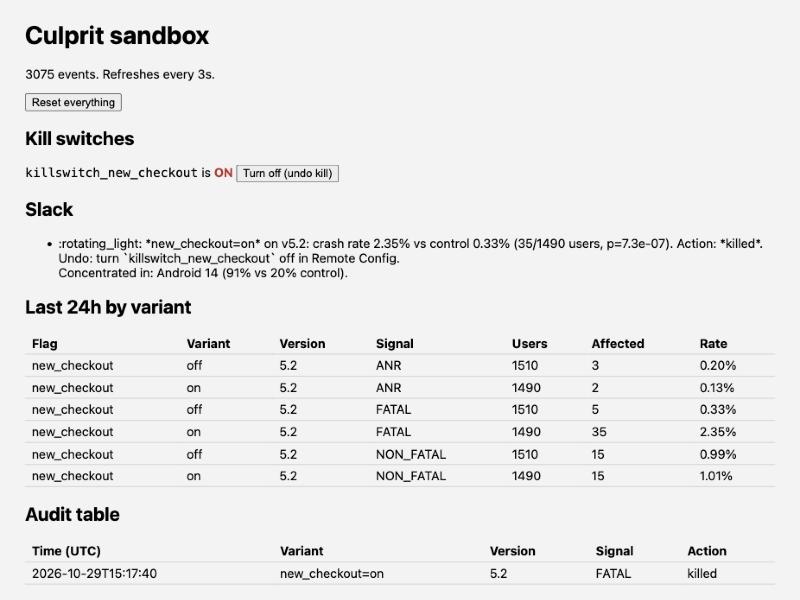
The sandbox serves a live page at http://localhost:8787/ that refreshes every 3 seconds. This is the Android 14 scenario after one job run with auto-kill:
What this does and doesn't prove
Covered by the sandbox
- Detection: thresholds, sequential test (mSPRT) and Bonferroni correction, over repeated looks
- Kill policy: auto-kill opt-in, non-fatal errors never kill
- No repeat alert within the 7-day window
- OS and device breakdown, and the Slack text
- Audit rows
- The app side: wrapper, tagging, kill switch serving control
Needs a staging project
- The BigQuery SQL against real Crashlytics and Analytics exports
- The Sentry queries and tag names
- Real Remote Config and Statsig writes
- Crash capture by a real SDK (iOS hangs need Sentry)
- Deploy, scheduler and IAM
The staging checklist is in the README.
Run it yourself
Python 3 only, no accounts:
python3 sandbox/server.py                     # then open http://localhost:8787/
cd sandbox && python3 simulate.py crash && python3 run_job.py --auto-kill
python3 benchmark.py                           # regenerates the numbers on this page
For the app, open sample/ios/CulpritDemo.xcodeproj in Xcode and run it on any iPhone simulator while the sandbox is running.